
Understand who really has access to your SharePoint content.
Analyze direct permissions, effective access, group membership, inheritance, sharing links and site administrators directly from SharePoint libraries and folders.
- 15-day free trial
- Direct permissions
- Effective access
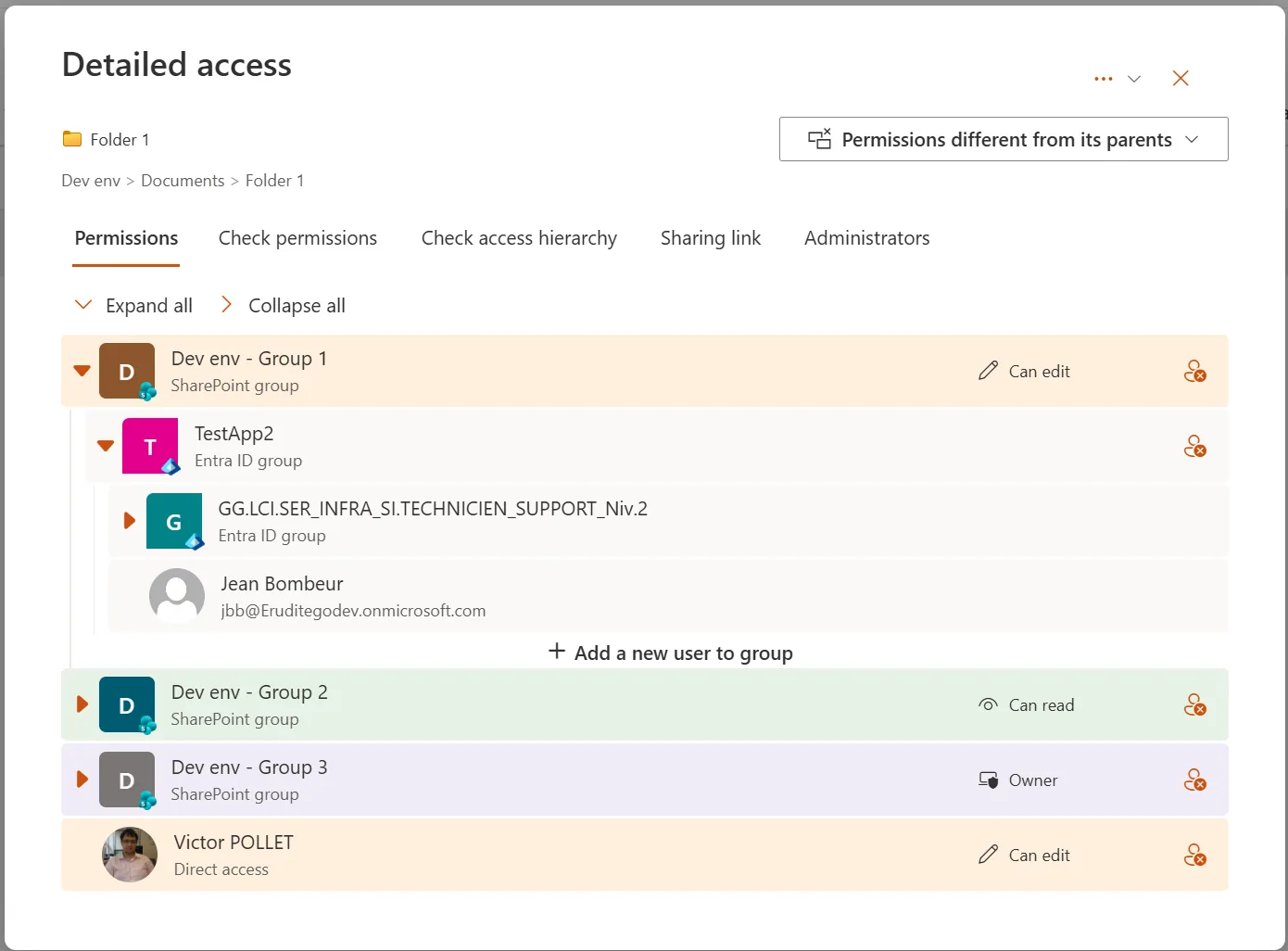
- SharePoint & Entra ID groups
The problem
SharePoint permissions are easy to configure — and hard to understand.
Access can come from direct permissions, SharePoint groups, Microsoft Entra ID groups, inherited permissions or sharing links.
When someone asks “Why does this user have access?”, answering the question often means navigating through several SharePoint settings pages and manually tracing group memberships.
Who has access?
Direct permissions alone do not show the complete picture.
Why do they have access?
Group memberships and nested access paths can make the answer difficult to trace.
Where is access inherited from?
Permissions may come from parent libraries, folders or unique item-level permissions.
Which links still grant access?
Sharing links can remain active with different scopes, permission levels and expiration dates.
The full picture
Get the full permission picture in one place
Detailed Permissions brings the information needed to analyze SharePoint access directly into document libraries and folders.
See effective access
Go beyond direct assignments to understand who can really access the selected content.
Trace the access path
Understand how users receive access through SharePoint and Microsoft Entra ID groups.
Follow inheritance
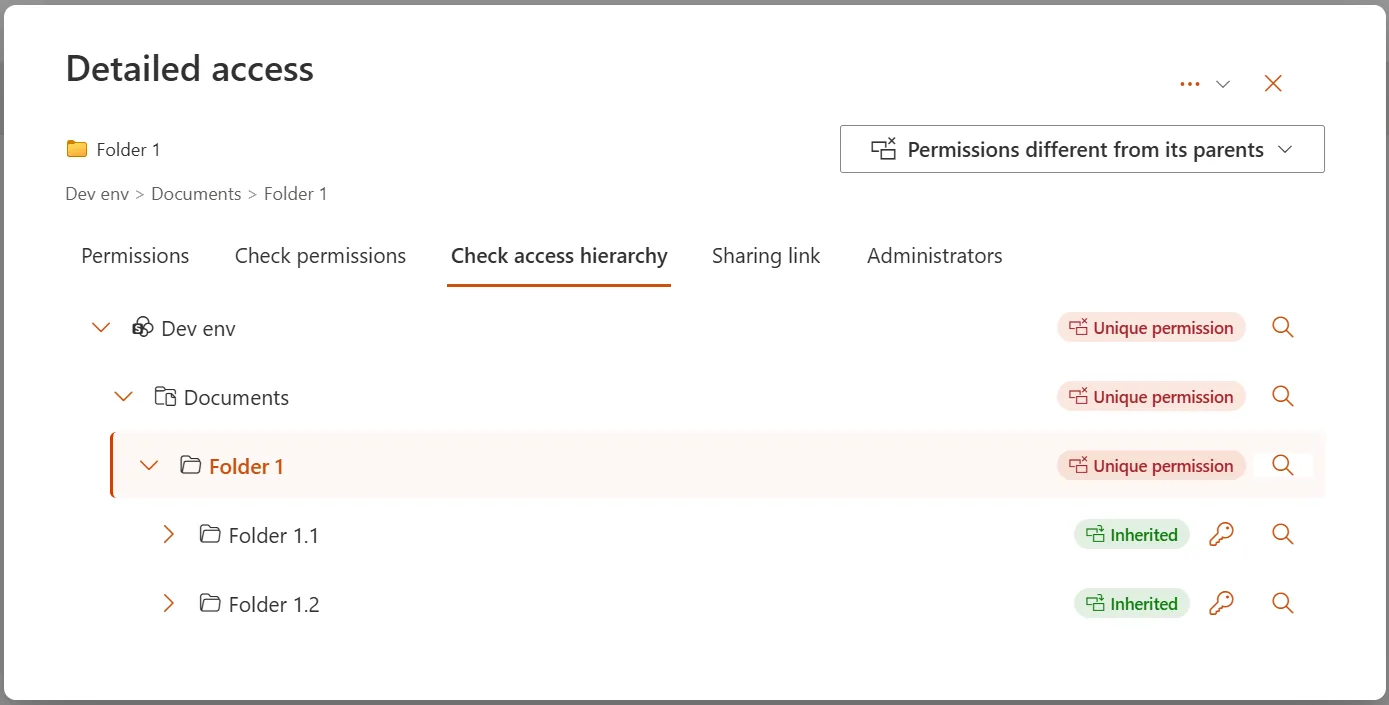
See whether permissions are inherited or unique and understand the parent-child relationship.
Review sharing
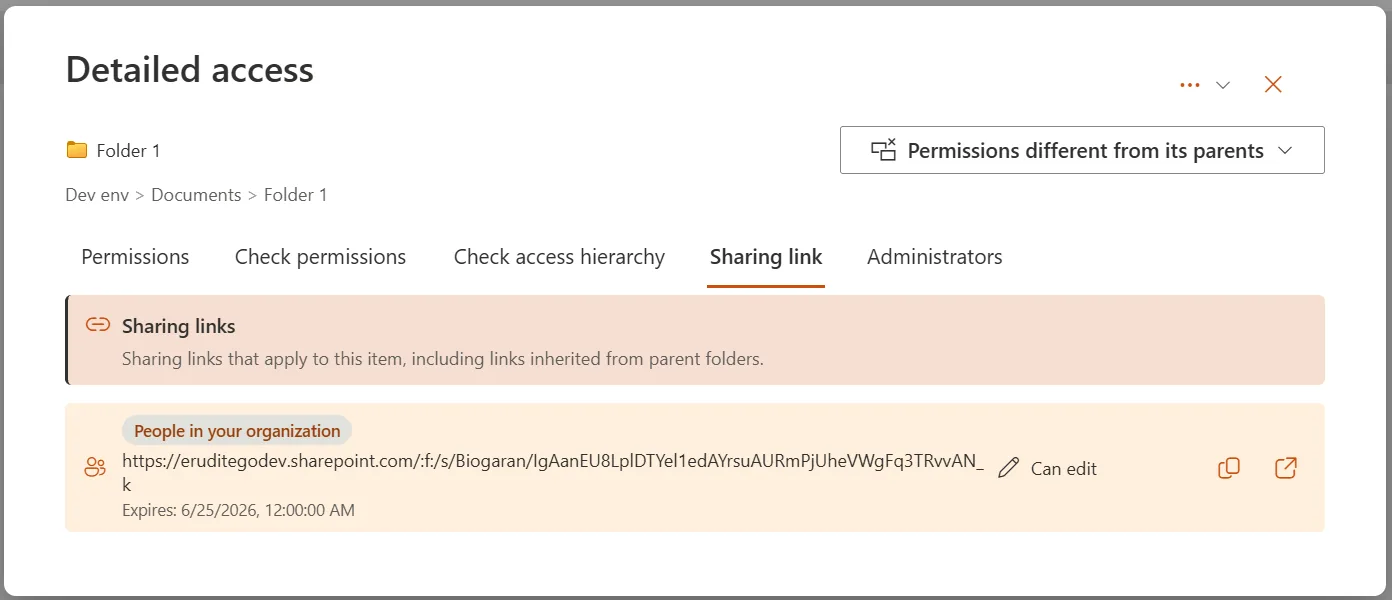
Inspect sharing links, their scope, permission level and expiration.
Key capabilities
Everything needed to analyze SharePoint permissions
Direct permissions
View permissions assigned directly to users and SharePoint groups.
SharePoint group expansion
Expand SharePoint groups to identify the users they contain.
Microsoft Entra ID group expansion
Expand Microsoft Entra ID groups to understand who effectively has access.
Effective permissions
Check the effective permissions of a specific user or Entra ID group.
Access path
Understand why a user has access by reviewing their group membership path.
Permission inheritance
Visualize inheritance from parent libraries and folders to child items.
Unique vs inherited permissions
Identify content using unique permissions or inherited permissions.
Sharing links
Review sharing links, including scope, permission level and expiration date.
Site administrators
Display site administrators when the current user has sufficient permissions.
How it works
Analyze permissions without leaving the library
Detailed Permissions adds a dedicated action directly to SharePoint libraries and folders.
- 1
Select content
Choose a document, folder or item in a SharePoint library.
- 2
Open Detailed Permissions
Launch the permission analysis directly from the SharePoint interface.
- 3
Explore access
Review users, groups, effective access, inheritance and sharing links.
- 4
Understand the reason
Trace how access is granted and identify unexpected or complex permission paths.
Effective access
Direct permissions are only part of the story
A user may gain access through a SharePoint group, a Microsoft Entra ID group, inherited permissions or a sharing link.
Detailed Permissions helps reveal the effective access path so administrators and site owners can understand why access exists.
Example access path · conceptual
01
User
02
Entra ID Group
03
SharePoint Group
04
Folder / Library
05
Permission level
Inheritance
See where permissions come from
SharePoint content may inherit permissions from parent libraries or folders, while selected items may use unique permissions.
Detailed Permissions helps users identify whether access is inherited or unique and understand the permission chain.
Sharing links
Review sharing links that still grant access
Sharing links can provide access outside normal permission assignments.
Detailed Permissions lets users review sharing links associated with the selected content, including their scope, permission level and expiration date.
Who it’s for
Built for people who need clear answers about SharePoint access
SharePoint administrators
Troubleshoot complex access and permission questions faster.
Site owners
Understand who can access content without navigating multiple settings pages.
Support teams
Answer user access questions with more context and less manual investigation.
Microsoft 365 teams
Analyze permissions in environments with nested groups, broken inheritance or complex document structures.
Use cases
Common permission questions, answered faster
Why can this user access this folder?
Who is really inside this SharePoint group?
Does this Entra ID group grant access here?
Is this item using unique permissions?
Where is this permission inherited from?
Which sharing links still apply to this content?
Troubleshooting
From permission confusion to a clear answer
Detailed Permissions is designed to simplify SharePoint permission analysis in environments where access is spread across groups, inheritance and sharing.
01
Less navigation
Analyze permissions directly from the library.
02
More context
See groups, inheritance and sharing information together.
03
Faster troubleshooting
Reduce the time needed to answer access questions.
Pricing
Simple annual licensing
Annual licence
€999 / year
Excl. VAT · per SharePoint tenant
- 15-day free trial on Microsoft Marketplace
- Unlimited users
- Direct permissions, effective access, groups, inheritance and sharing links
Partner and enterprise discussions available.
Get started
15-day free trial on Marketplace
Install from Microsoft Marketplace, or buy a legacy licence online.
City of West Vancouver
Used in real SharePoint environments
Detailed Permissions is deployed for the City of West Vancouver — helping SharePoint teams answer access questions where they work.
FAQ
Frequently asked questions
What does Detailed Permissions analyze?
It helps users inspect direct permissions, effective access, SharePoint groups, Microsoft Entra ID groups, inheritance, sharing links and site administrators.
Can it show why a user has access?
Yes. Detailed Permissions can help trace the access path through group memberships and inherited permissions.
Can it expand Microsoft Entra ID groups?
Yes. It can expand Microsoft Entra ID groups to help identify who effectively has access.
Can it show inherited and unique permissions?
Yes. It helps identify whether permissions are inherited or unique and visualizes inheritance from parent libraries and folders.
Can it review sharing links?
Yes. It can review sharing links associated with the selected item, including scope, permission level and expiration date.
Can it display site administrators?
Yes, when the current user has sufficient permissions.
Is there a free trial?
Yes. A free 15-day trial is included when the extension is installed.
How much does Detailed Permissions cost?
Detailed Permissions is priced at €999 excl. VAT per year, per SharePoint tenant. A 15-day free trial is available on Microsoft Marketplace. Legacy licence purchases are also available online.
Where is Detailed Permissions used?
It is used directly from SharePoint document libraries and folders through a dedicated extension action.
Microsoft Marketplace
Built for SharePoint
Detailed Permissions is a SharePoint list extension designed to help administrators, site owners and support teams understand permissions directly where they work.
Need a clearer view of SharePoint permissions?
Analyze effective access, groups, inheritance and sharing links directly from SharePoint.